Summary Checklist for the dynamic rulebook
Source of truth: The markdown file
Images: Control sizes via the image Shortcode
Styles:
Print - Affinity's Text Styles Panel

Web - assets > css > print.css (also regular article.css)
Process
Edit Markdown version of the rules as required
Run .\build-rules.ps1 to update the web page and print version html and convert the print html to .docx
Open Affinity > Window > Resource Manager
Update the connection to rulebook.docx (it will show “Modified”)
Some styles may duplicate
Push to Github Desktop to backup all files and update website
Not all sunshine and roses
There’s inevitably a fair bit of elbow grease still involved. I’m likely going to be able to get all my images exporting out at close to the right size with a bit of tweaking to my image shortcodes of my website, so for web they are already set for certain sizes, but for print this is yet to be set (though I can likely hijack the same system). Currently I’ve been using the select alike based on width then scaling down by percentages.
My main concern are the Text Styles not mapping across properly. At first I was trying a Layer > Select > Same process, but that only worked (albeit well) for images.
Next I was trying to use the ‘Update Text Styles’ or deleting the new duplicates in hopes it would revert back. Nope.
Next was the ol’ Find and Replace of each character style back to the old one. Which worked well, but is clunky and slow.
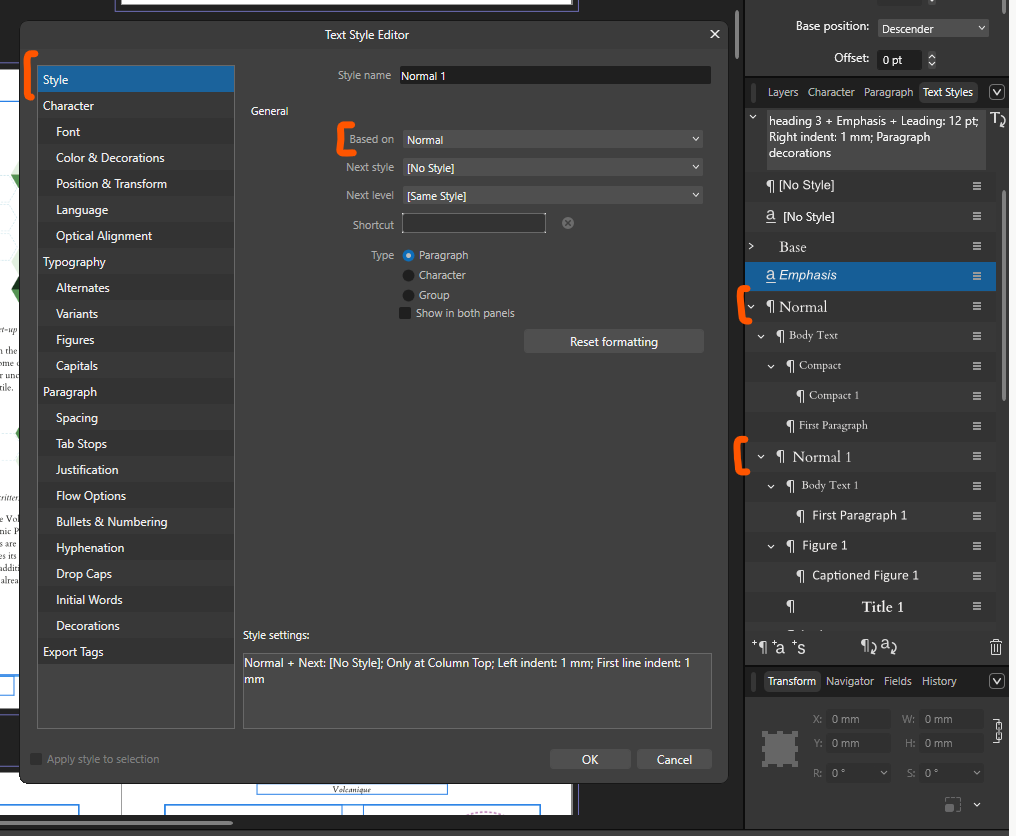
Finally I found the Style > Based On setting when editting text style. Then I can clean up with ‘Delete Unused Styles’. This is still a bit clunky and it would be great if Affinity could have this updated to just work, or give an import window to ensure the correct styles are mapping. But I’m sure it’s a lot easier said than done.
A decent chunk of the way there
Check that out the text style mapping version here
Pretty happy that this is actually working, I did add in a few column breaks to pop some headings into the right spot, but hopefully I’ll be able to tidy that further with just default text style settings too.
Lava your comments here
Loading comments...